Dont Wait for Future Be The Future
Showing posts with label News. Show all posts

Saturday, 7 January 2017

BHIM APP:The easiest way to go cashless


Few days ago, Prime Minister Narendra Modi announced a new digital payments app named BHIM — Bharat Interface for Money — after Babasaheb Dr Bhimrao Ambedkar. It is for now available only on Android — so iOS and Windows mobile users are left out. The BHIM app is supposed to support Aadhaar-based payments, where transactions will be possible with just a fingerprint impression, but that facility is yet to start.
So what can BHIM do?
BHIM is a digital payments solution app based on the Unified Payments Interface (UPI) from the National Payments Corporation of India (NPCI), the umbrella organisation for all retail payments systems in India. If you have signed up for UPI-based payments on your bank account, which is also linked to your mobile phone number, you’ll be able to use the BHIM app to carry out digital transactions.
BHIM will let you send and receive money to other UPI accounts or addresses. You can also send money via IFSC (Indian Financial System Code) and MMID (Mobile Money Identifier) Code to users who don’t have a UPI-based bank account. There’s also the option of creating your own QR (Quick Response) code for a fixed amount of money, which the merchant can scan to make the deduction.
Is BHIM then just another mobile wallet?
No. You can store a limited amount of money in a mobile wallet like Paytm or MobiKwik, which you can send only to someone who is using the same wallet. But BHIM is UPI-based, and thus linked directly to a bank account. All the payee needs is a bank account. If this account is UPI activated, you can just ask for the payee’s VPA or virtual payment address, and make the payment to that account.

Otherwise, there’s the option of IFSC or MMID for sending or receiving money. The advantage is there’s no need to remember an account number, or to share it with anyone. The VPA is all that is needed. Up to Rs 10,000 can be sent per transaction, and up to Rs 20,000 in any 24 hours.
Which banks support the BHIM app?
The list is long: Allahabad Bank, Andhra Bank, Axis Bank, Bank of Baroda, Bank of Maharashtra, Canara Bank, Catholic Syrian Bank, Central Bank of India, DCB Bank, Dena Bank, Federal Bank, HDFC Bank, ICICI Bank, IDBI Bank, IDFC Bank, Indian Bank, Indian Overseas Bank, IndusInd Bank, Karnataka Bank, Karur Vysya Bank, Kotak Mahindra Bank, Oriental Bank of Commerce, Punjab National Bank, RBL Bank, South Indian Bank, Standard Chartered Bank, State Bank of India, Syndicate Bank, Union Bank of India, United Bank of India, and Vijaya Bank.
OK, and how exactly does the app work?
BHIM lets you choose your preferred bank, after it has verified your mobile number. You get an SMS, so it’s best to use the same number as the one that’s linked to the bank account. BHIM will ask you to set a 4-digit passcode. Pick something you won’t forget easily because you’ll need the code every time you open the app.
The app will then ask you to select your bank. If your account is UPI activated, it will reflect the relevant number. You’ll see options to send and receive money, and transact via IFSC. If UPI is not activated, you can put in six digits of your debit card number, and the expiry date, after which the app will let you use it.
To send money, type in the mobile number or VPA address. BHIM will verify the payee. Type in the amount, and hit pay. If the payee doesn’t have UPI, tap on the three dots above the send money option. The ACCOUNT + IFSC option will open up, where you can put in the details.
One problem currently is that you can access only one account per mobile number. So if your number is linked to two accounts, you will have to disable the selected one and go back to the bank selection option.
How do I create a VPA for UPI on my account?
Make sure your mobile number is linked to your bank account, and then get the the bank’s official mobile banking app from the Google Play store. Do check the developer, etc. before installing because you need to make sure you are not downloading a malicious or fake app masquerading as one from your bank. If unsure, check with the bank.
Once you have the app, you’ll be able to locate the tab about UPI payments. Go there and create a VPA. Keep it simple, so that you don’t forget it — such as your name@your bank’s name. Then create a UPI PIN, which will be needed to complete a transaction in BHIM.
Once your VPA is created, you’ll see options to send, receive money or pay by scanning QR code. If you have more than one account with the same bank, you can choose the default account for transactions via UPI. This VPA is essentially all that you need to carry out a transaction.


What’s so special about BHIM then?
BHIM also has options to transfer via IFSC and MMID as well for non-UPI banks. It indicates the government has decided to go with one app that will enable digital payments via UPI. Of course, for BHIM to be of use to a majority of people, everyone must start accepting and activating UPI as a payment method

click here to download the app:

//Thank You Guys for Reading. If You like it then Share. In case You face any issues You can comment below!Jai hind

Jai bharat

Read More

Friday, 6 January 2017

TOP MOBILE GIANTS UNDER 15K

            
Booming smartphone industry is a sign of great advancement of technology.If we look back to early 2000's very few mobile phones are there in the market but nowadays you will find everyday new phones in the market.Sometimes a lot of options can create a chaos.So,here i am giving you the top 3 mobile phones in the range 11k to 15k.


1.)Moto G4+


The Moto G4+ consists of a 16 MP rear camera with dual LED flash,laser auto focus and the device also supports 1080 high definition video quality.On the front it contains a 5MP camera with OV 5693 sensor and 84 degree wide point lens for selfies and video calling.

Key specs-
1.)Snapdragon 617 64-bit processor

2.)16,32 GB storage

3.)2,3 GB RAM

4.)16 MP camera

5.)3000 MAH battery

6.)Finger print sensor

WHY TO BUY-

  • Light weight
  • Best camera in this range
  • Turbo charging(charge for 6 hours in 15 min)

WHY NOT TO BUY-

  • Heating issues 
  • Plastic finish
  • No water resistant

2.0) XIAOMI REDMI NOTE3-


It is packed with Qualcomm's snapdragon 650c.The phone ships with an android lollipop fork called MIUI 7.The  rear camera is 16 MP and a wide f/2.o aperture.Both landscape and macro shots captured in daylight have good detail, but the low light images are not the best.The non removable battery of 4050 mAh gives 12 hours and 21 minutes of continuous video playback.Overall it is a good package.

KEY SPECS-

1.0)Display 5.5 inch

2.0) 1.4 GHz  Snapdragon 650 hexa core CPU

3.0)2,3 GB RAM

4.0)16, 32 GB storage

5.0)5 MP front camera and 16 MP rear

6.0)Finger print sensor


WHY TO BUY-


  • 4050 MAh battery
  • audio quality is good
  • vivid display
  • strong CPU performance
  • value for money
WHY NOT TO BUY-
  • Heavy weighted
  • camera could be better
  • Hybrid slot
  • No gorilla glass


LENOVO ZUK Z1-


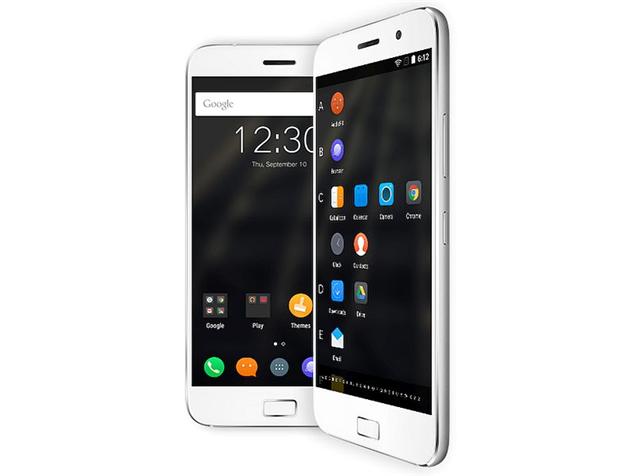
The phone comes with a 5.50-inch touchscreen display with a resolution of 1080 pixels by 1920 pixels at a PPI of 401 pixels per inch. Lenovo Zuk Z1 price in India starts from Rs. 13,499. The Lenovo Zuk Z1 is powered by 2.5GHz quad-core Qualcomm Snapdragon 801 processor and it comes with 3GB of RAM.

KEY SPECS-

 1.0)5.5 inch display screen
 2.0)3 GB RAM

 3.0)64 GB storage

 4.0)2.5 GHz quad-core Qualcomm snapdragon 801 processor

 5.0)4100 MAh non removable battery

 6.0)13 MP rear camera and 8 MP front camera

WHY TO BUY-
  • Huge internal storage of 64 GB
  • Great camera with 1080p video recording
  • Corning Gorilla Glass 3 Protection
  • Phone support Type C 3.0 USB for fast data transfer and fast charging.
  • 4100 mAh huge battery with quick charge facility
  • Fast fingerprint sensor
  • Rooting wont cause any warranty lose

WHY NOT TO BUY-
  • No external SD card support
  • camera could be better
  • You cant expect any updates of cyanogen now
  • No NFC as well as IR blaster
  • 32 bit CPU
  • OS of the device is not stable.
4.0)LeEco Le-2-


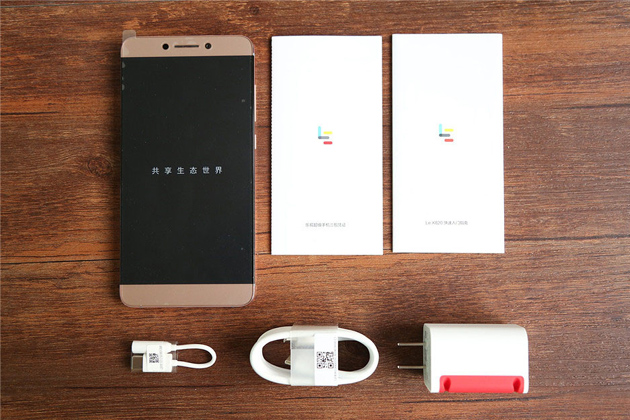
LeEco Le 2 smartphone was launched in April 2016. The phone comes with a 5.50-inch touchscreen display with a resolution of 1080 pixels by 1920 pixels at a PPI of 403 pixels per inch. LeEco Le 2 price in India starts from Rs. 11,999. 

The LeEco Le 2 is powered by 1.8GHz octa-core Qualcomm Snapdragon 652 processor and it comes with 3GB of RAM. The phone packs 32GB of internal storage cannot be expanded. As far as the cameras are concerned, the LeEco Le 2 packs a 16-megapixel primary camera on the rear and a 8-megapixel front shooter for selfies.

The LeEco Le 2 runs Android 6.0.1 and is powered by a 3000mAh non removable battery. It measures 151.10 x 74.20 x 7.50 (height x width x thickness) and weighs 153.00 grams.


KEY SPECS-

1.)Qualcomm Snapdragon 652 hexacore chipset

2.)Aderno 510 GPU

3.)16 MP primary and 8 MP secondary camera

4.)Type C USB port 

WHY TO BUY-


  • Gaming performance is pretty awesome
  • Fast charging
  • Good battery backup
WHY NOT TO BUY-
  • NO 3.5mm audio jack
  • Non expandable storage
  • Build quality is not that good.
  • average camera performance
VERDICT-
If you are looking for a reliable phone with good camera and searching for a trusted brand then you should go for MOTO G4+.
If you are a developer and like to explore the true potential of your mobile phone then go for ZUK Z1 and if you believe in performance only then go for LE-2.
Also, RED MI NOTE 3 provides you the good package in a phone with average cam quality.

Now,you can choose the best out of them.All are good mobile phones and give you value for money.Best of luck!!!!!


//Thank You Guys for Reading. If You like it then Share. In case You face any issues You can comment below!
Jai hind
Jai bharat


Read More

Wednesday, 24 February 2016

Xiaomi Mi 5 unveiled at MWC 2016


At Mobile World Congress in Barcelona today, Xiaomi finally unveiled the flagship Mi 5. It will be available in gold, black and white color variants. The device will be available in three versions, out of which one will include 3GB LPDDR4 RAM and 32GB inbuilt storage priced at CNY 1,999 (approximately Rs 21,000), the second will include 3GB LPDDR4 RAM and 64GB storage priced at CNY 2,299 (approximately Rs 24,000) while the high-end exclusive version featuring 4GB LPDDR4 RAM and 128GB storage will be priced at CNY 2,699 (approximately Rs 28,300).
The Mi 5 will also go on sale in China on March 1, the same day as the Xiaomi Mi 4s, which was launched today.


In terms of specifications, the device sports a 5.15-inch full HD display and features a 3D curved glass body with the 32GB and a ceramic body for the 128GB variant. Is’s only 7.25 mm slim and weighs just 129 grams, less than the iPhone 4S. It packs in a physical home button with a fingerprint sensor as well.
The device will be available in 3 variants. While the rest of the camera, memory type and other hardware remain the same across all variants, the CPU speed, RAM and construction materials vary.
Xiaomi Mi 5 base model for CNY 1,999 (Rs 21,000)
Snapdragon 820 @ 1.83GHz, 3GB RAM, 32GB storage with a 3D glass back.
Xiaomi Mi 5 64GB model for CNY2,299 (Rs 24,100)
Snapdragon 820 @ 2.15GHz, 3GB RAM, 64GB storage with a 3D glass back.
Xiaomi Mi 5 PRO for CNY2,699 (Rs 28,300)
Snapdragon 820 @ 2.15GHz, 4GB RAM, 64GB storage with a 3D ceramic back.
All 3 devices will run Android 6.0 Marshmallow—the first Xiaomi devices to do so—with MIUI 7.
It comes equipped with a Sony IMX298 sensor 16MP rear camera with PDAF and DTI technology. It also shoots 4K videos and includes optical image stabilization (OIS). The OIS system is worth talking about because Xiaomi has apparently designed it with 4-axis stabilization, allowing for incredibly stable photos.
For selfie lovers, the  smartphone includes a  2 micro-meter based sensor, 4MP camera.


Read More

Sunday, 23 August 2015

Introduction to Android 6 #Marshmallow


After the guessing game that went on for months, Google has finally announced its next Android iteration will be named after the sweet treat Marshmallow. So, now M is for Marshmallow.
Marshmallow was one of the highly speculated name that fits Google’s nomenclature of sweet treats like – Cup Cake, Eclair, Froyo, Gingerbread, Honeycomb, Ice Cream Sandwich, Jelly Bean, KitKat and Lollipop. It beat other probable names like mud pie, mousse, and our very favourite Malai Barfi.
The company revealed the name on its developers blog and alongside also revealed the final Android 6.0 SDK that will be available for download via the SDK Manager in Android Studio. It will bring access to final Android APIs and latest build tools.
“Today with the final Developer Preview update, we’re introducing the official Android 6.0 SDK and opening Google Play for publishing your apps that target the new API level 23 in Android Marshmallow,” Jamal Eason, Product Manager, Android writes in a blogpost.
Marshmallow brings new platform features such as fingerprint scanner and Doze power saving mode, but along with that also offers new permissions model.
Google Play is also made ready to accept API 23 apps via the Google Play Developer Console. At the consumer launch later this year, the Google Play store will be updated so that the app install and update process supports the new permissions model for apps using API 23.
“Classes for detecting and parsing bar codes are available in the com.google.android.gms.vision.barcode namespace. The BarcodeDetector class is the main workhorse — processing Frame objects to return a SparseArray<Barcode> types,” he further adds.
Google has also revaled its new lawn statue similar to the droid seen above.
Needless to say, Android Marshmallow brings new app permissions, custom Chrome Tabs, fingerprint support and improved power management.
Take a look at some of its cool new features announced earlier this year:
App Permissions 
The App Permissions got a major overhaul and Google will allow users to decide which permissions they want to allow or revoke, based on when those particular functions are used. Unlike the current implementation, where users have to agree to all app permissions on first install and also for updates, in Android M, users will get notifications asking for permissions only when they are using a particular function in an app.
Google has identified eight parameters including location, camera, contacts and so on, to help you give permissions for these. So for instance, in WhatsApp if you want to send a voice message, the App Permissions tab will pop up, asking you for permission to use the microphone. You can also revoke the permission later if you so wish. Also, app updates will also not ask you for permissions off the bat, unless you are using a feature which needs you to grant that particular app some permission.
Web Experience: Custom Chrome Tabs
The web browsing experience with the Chrome browser also gets a shot in the arm. Chrome Custom tabs, a new feature, that will let you include webviews within a particular app, without the need to switch to the Chrome browser on your phone. The Chrome browser will run atop your app (in case you click on any link within the app). Features such as automatic sign-in, saved passwords, autofill will work on the apps seamlessly. Also the Chrome Custom tab will take up the colours and fonts of the app it is being opened within, to make it seem like a seamless experience. In principle it seems closer to Facebook’s Instant Articles, with the difference being that the Chrome Custom tabs will make you feel like you are within the app that you are browsing.
App Linking
Android currently supports the app linking system, also known as Intents, which gives you the choice to open a particular web link in a web browser or an app. Before, if you had a Twitter link in say your inbox and you clicked on it, you got a prompt asking if you want to open the link in your browser or within the Twitter app, which is installed on your phone.
Android M will let developers add in an auto-verify feature within their code, which will help open the link within the respective app (provided the app is installed on your phone). In the background, the Android M OS will verify the link with the app’s server and post-authentication will proceed to open the link within the app itself, without asking you where you want to open the link.
Android Pay
This feature will let you make your payments using near-field communication (NFC) and host card emulation techniques for tap-to-pay services. You just need to unlock your phone, keep it near an NFC terminal and your payment is done, without opening any app. Google says when you add in your card details, a virtual account number is created to make your payments. Your actual card number is not shared with the store during the transaction.
According to Google, Android Pay will be pre-installed on AT&T, Verizon and T-Mobile devices and will be accepted in around 700,000 stores in the US which accept contact-less payment. Android Pay will replace the Google Wallet app. Android Pay can also be used to make in-app payments provided developers integrate Pay into their apps.
Fingerprint Support
Android M will standardise the fingerprint sensor support and it is working with various phones to make a standard API to go with their sensors. You can use your fingerprint to authorise an Android Pay transaction, unlock your device or make Play Store purchases.
Power management
Android M will feature a smart power-managing feature called Doze. This feature works by letting system optimally manage the background processes. The OS keeps a tab on the motion detection sensor and if there is no activity for a long time, the system shuts down some processes. Since it is in the Doze stage, the system can still get activated by alarms and high priority notifications. According to Google, this feature has helped increase the standby-time on the Nexus 9 by almost two times over the Android 5.0 Lollipop.
Android M will also support USB Type-C for charging. And considering USB Type-C is has a bi-directional port, you can use this port to either charge the phone as welll as charge another device.
Apart from these main features, some of the other improvements include a better implementation of Copy/Paste function. So in Android M, you will get a floating toolbar just above your selection with the Cut, Copy, Paste options. Direct Share feature will let you share images or links with your most frequently shared contacts or apps, using a single click. Volume controls will also give you a drop-down menu, a feature that is common on the Cyanogen OS

Read More

Tuesday, 28 July 2015

One Plus 2 Launched


OnePlus has launched its all new OnePlus 2 in the world’s first virtual reality launch event. The event started with Carl Pei talking about doing crazy things and OnePlus fans talking about their experience.


The OnePlus 2 won’t make you wait too long as it is set to come to India, US, Canada, EU and China on August 11. The 16GB model will be available for Rs 22,999 and 64Gb model at Rs 24,999.  The device will roll out in Southeast Asia in Q4 of 2015. It comes with the company’s classic Sandstone Black back cover. It will debut with four StyleSwap covers namely, Bamboo, Black Apricot, Rosewood and Kevlar. 


Price revealed Video


Design-wise, the metal-design makes it look plush and premium. The company has also taken out the logo from the front. It sports a 5.5-inch 1080p display. As promised, the smartphone also comes with a fingerprint scanner and USB Type-C port. The fingerprint scanner is faster than the iPhone TouchID and lets you save up to five fingerprints, says OnePlus.
On the camera front, it comes with a 13-megapixel snapper. It also gets a new camera and a new solution that allows you to take 50MP photos and there’s also the slow motion mode. It comes powered by Snapdragon 810 coupled with 4GB of RAM.

It runs OxygenOS, and says it isn’t your pure Android. It comes with some significant changes. It allows you drastically change the look and feel of the device with a single switch. The colour mode will let you select custom accents colours, or even use dark mode. App Permissions lets users control what apps can access, such as your location, identity, or contacts.
The OnePlus 2 has a 3300mAh battery.
Meanwhile Android Central has got an exclusive hands-on with the device and has also revealed some high-end images of the upcoming device.

Image: TheVerge

The OnePlus 2 will follow the same invite-only pattern for sale. In a recent post on its forum,OnePlus said, “As Carl has already mentioned, invites are still a necessity, but we’re striving to make the process as painless as possible thanks to more inventory, a reservation list, and a quicker rollout of shareable invites.”
The post explains how users could get their invite to the OnePlus 2. According to the post, all those who were early adopters and “fervent supporter” will be given priority. OnePlus will also be recognising the contribution of all those who helped spread the word around OnePlus One and taking it “from an unknown company to where we are today”.

The post adds, “Specifically, I’m talking about phone smashers, early forum members, early purchasers and the most active OnePlus One invite evangelists. We want to show you our gratitude by offering you some of the first invites to purchase the OnePlus 2.”

Read More

Friday, 19 June 2015

Narendra Modi App


We’re referring to the app developer’s buzzword. Responsive is one that adapts itself across devices and screen sizes. It’s the latest buzzword in the technology space. Indeed, Narendra Modi is present on screens across all form factors. However, the term responsive is associated with the way your site adapts itself to varying screen sizes. Yesterday, India’s PM Narendra Modi announced the ‘Narendra Modi App’ on Twitter:

Western governments have had a distinct set of rules for digital communications and ensure every website, microsite, webpage or digital app follows design philosophies laid down by the government.
India’s Prime Minister is now using mobile applications to engage with citizens, which is welcome. We downloaded the application and explored it. So here’s a review of the official Narendra Modi app.
You begin by downloading the app from the Google Play Store. Once you install the app, enter your phone number and date of birth. You can access the menu from the top right.


The date selector makes it easy to choose the date, month and year with a slider. Next, in the ‘News’ section, you can choose between ‘Recent’ or ‘Popular’ news items by setting the button on the top right.


You can get updates, watch the Mann Ki Baat programme by the PM. You can also write to the Prime Minister and give ideas and suggestions to “be an active partner in nation building.”


The app also gives you a glimpse of all that is communicated across social media channels such as Facebook and Twitter, the PM’s blog, and his speeches.


From the interviews given by the PM, to government data, you’ll get access to it all. It’s Narendra Modi everywhere!


In the 30 minutes since installing the application, we’ve received 3 notifications. One, a greeting for Ramadaan, the other greeting the people of Seychelles on their National Day and of course the announcement of the app being launched.
And yes, you get points for interacting with the application. On a lighter note, we wonder if these points would result in gratification for the end user.
We hope the data captured by the app is secure and isn’t hacked in the future. Thecollaborative approach taken by PM Narendra Modi in building mobile applications for the PMO is a good step indeed.We’ll wait and see how the app takes off on the Play Store, and compare it to some of the popular political apps out there!
Read More

Thursday, 4 June 2015

Google I/O 2015 Highlights


Android M


EYNTK IO 2015

Android M looks a lot like its predecessor Lollipop. It’s more like a reorganization of Android, with power optimization, new services, and changes to how your apps interact. If you’re a developer, you can check out the preview today. Otherwise, you’ll be getting it later this year.

APP PERMISSIONS GET LESS INTIMIDATING

Android has traditionally given you a wall of permission requests — accessing your location, using your microphone — whenever you install a new app. That’s all supposed to be changing with Android M. There are fewer update categories, and you’ll no longer be asked to look at them on installation. Instead, Google will ask you to approve individual permissions when the developer calls them up. You can also look up everything that the app is accessing, or which ones are using, say, your calendar or camera.


CHROME IN ALL YOUR APPS


EYNTK IO 2015


Right now, when you click on a web link from within an app, you either have to load the browser or use a stripped-down web view in the app. Google announced something called Chrome Custom Tabs, which looks like an in-app Chrome browser and is supposed to make loading pages faster by preloading certain elements, including passwords and autofill. Google also announced measures to make it easier for apps to link to other apps, for example, loading the Twitter app automatically when you click on a link to a tweet.


BETTER BATTERY LIFE AND USB-C


EYNTK IO 2015
In an effort to save battery life, Google introduced a new feature called Doze. Android M uses motion detection to go into deeper sleep if inactive for longer periods of time. Google said it trades "app freshness" for battery life. While dozing, devices can still respond to high-priority messages and use alarms. In a test against a Nexus 9 running Lollipop, Google, said the M Nexus lasted up to two times longer in standby. USB Type-C will also be supported on Android.


GOOGLE NOW ON TAP


EYNTK IO 2015

Google Now is getting smarter, and it’s going to be incorporated throughout the phone, through a program called Now on Tap. With Now on Tap, you can hold the home button and bring up Now cards with relevant information, whether you’re in an app, email, or web browser. For example, if someone emails you about going to a movie, summoning Now displays information about whatever was mentioned, with links to YouTube trailers, ratings, and other info. If you’re messaging about laundry and dinner, it can prompt you to set up a to-do item, and give you restaurant listings, along with buttons for Yelp, Maps, and OpenTable. It’s a big expansion for Now, and Google emphasized improvements in contextual understanding. In the demo, asking "What is his real name?" while listening to Skrillex in Spotify brought up the answer without needing to specify "Skrillex."


A NEW GOOGLE PHOTOS APP WITH FREE ONLINE STORAGE


EYNTK IO 2015
Google already has a photo tool for your Android phone, but Google Photos is a revamped app that will back up an unlimited number of photos and videos for free (photos up to 16MP, video up to 1080p), organize them as a timeline, and group them together by locations, things like "beaches" or "boats," and people  using what purports to be some pretty advanced auto-tagging. And there are new interface tools for sharing your photos or making collages and movies out of them. Yes, it’s competing with some similar iOS tools, but it could stack up pretty well; it’s available starting today for Android, iOS, and web.


OFFLINE MAPS AND CHROME FOR DEVELOPING COUNTRIES


EYNTK IO 2015
Google announced a bunch of updates designed to make its products work better in parts of the world with poor connectivity. A new streamlined search results page will load faster with a spotty connection and optimize pages to load fewer images. Google already lets people save YouTube videos offline in some countries, but now, Chrome will also be able to save pages for offline use, and Google Maps will be able to run a bunch of features offline. In an onstage demo, it could autocomplete searches, show reviews and information, and give turn-by-turn directions offline.


Android everywhere


There's more to Android than phones, obviously. If Google has anything to say about it, it'll be on your wrist, in your house, and in your wallet... sort of.

SOME MORE POLISHING FOR ANDROID WEAR


EYNTK IO 2015
Google added some powerful new apps to its Android Wear smartwatch OS, including an easy option for calling Uber cars. It also reiterated some of the ways it's smoothed out the platform. The screen in Android Wear is always-on, Google noted several times, and now apps will be always-on as well, displaying information in a low-power black-and-white mode. If you’re navigating with Google Maps, for instance, directions will stay on the screen, making them glanceable as you move. There’s also a new app launcher designed to make loading apps faster and easier. There are a bunch of other small updates as well, including the ability to recognize drawings and turn them into emoji.


GOOGLE WANTS TO MANAGE YOUR SMART HOME


EYNTK IO 2015
Project Brillo is an operating system built on the "lower layers of Android," Weave is a communications system that will let smart devices talk to each other, andGoogle hopes you’ll install both of them on your door locks, light bulbs, and thermostat. There’s built-in support for Wi-Fi and Bluetooth, and Google will have a certification platform for Weave, which companies can use with or without Brillo. A lot of people have tried to create a standard for home automation, including Google — it announced Android@Home back in 2011 — but Google will officially be throwing its hat in the ring again by the end of this year.


ANDROID PAY GETS CLOSER


EYNTK IO 2015
We’re getting some more details about Android Pay — which is both Google’s answer to Apple Pay and a second chance for the largely failed Google Wallet service. Android Pay will let you make purchases in apps or tap an NFC sensor to pay for physical goods. Android Pay will work with phones running KitKat and higher, and it’s supposedly being pre-installed by AT&T, Verizon, and T-Mobile; Google promises 700,000 stores will accept it, including Chipotle and Dunkin Donuts. And if your phone has a fingerprint sensor, you can use it to authenticate payment.


HBO NOW IS COMING TO ANDROID


EYNTK IO 2015
We thought we might hear more about TVs from Google this year than we did, but though there wasn’t much news about the Chromecast or Android TV, we did get one new development. HBO Now, the streaming-only service for watching everything from Game of Thrones to True Detective, is coming to Android. There’s no firm release date, but this marks the end of Apple’s exclusive access.


Read More
Designed ByBlogger Templates